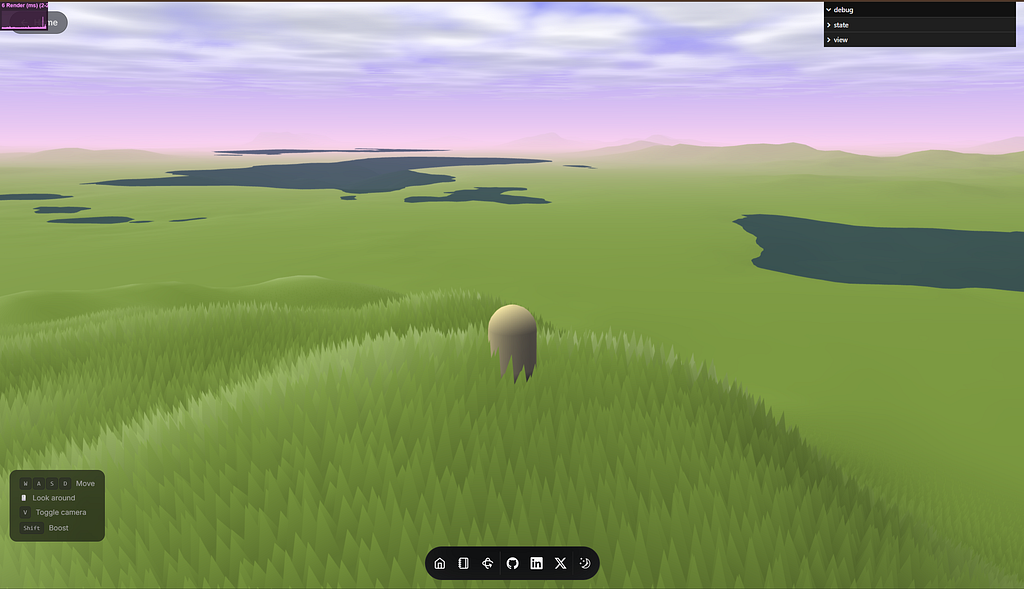
Currently doing my Internship in Lagos, and it’s been raining a lot lately.
It’s not the light, apologetic kind, it’s the kind where you’re stuck watching the sky turn a dark shade of grey-blue before it opens up, and everything around you becomes noise and water. You really do not want to be under the skies when the weather hits, and I’ve been very lucky to spend those hours either at my desk at work accomplishing my tasks, or at my desk at home catching up on old shows, drawing or tinkering with something/someone I find fun.
On one of those evenings, watching the rain do its thing, I looked up from my screen and thought: how would I even build this?
The clouds, the light shifting behind them, the way the whole atmosphere changes mood in the space of twenty minutes. The world I was building had a day/night cycle, sure, but the sky was mostly decorative. It didn’t feel alive the way the sky outside did.
That thought sent me down a long road. This is where it went.
The sky wasn’t good enough
Bruno’s original engine had a sky dome. It reacted to the sun position, shifted colors between day and night, did the job. But it was a static gradient solution — the kind of sky that reads as “sky” without really convincing you it’s atmosphere. No clouds, no depth, no sense that there was actually something up there.
I wanted volumetric clouds, actual 3D clouds with depth you could look through, self-shadowing, the works. That meant raymarching.
Raymarching in a shader is exactly what it sounds like: for each fragment on the sky dome, you fire a ray from the camera through that pixel and step along it in small increments, sampling a noise field to determine how much “cloud” you’ve accumulated. The result reads as volumetric geometry even though it’s entirely computed per-pixel with no actual mesh.
The cloud slab lives between y = 100 and y = 250. Its shape is generated from a periodic 3D Perlin-Worley noise texture — Perlin for the large-scale billowing, Worley for the internal cell structure that gives individual clouds their fluffy, cauliflower edge. Each ray marches through that slab and accumulates density, then maps density to color and shadow.
The problem is that raymarching is expensive. Really expensive. Doing it at full resolution, every frame, for every pixel in the sky is not something you do casually. The solution was a two-pass render pipeline: the sky dome renders into a low-resolution offscreen WebGL render target first, and then a fullscreen background quad samples and upscales that texture onto the screen.
// customRender.js (simplified)
renderer.setRenderTarget(this.renderTarget) // low-res offscreen target
renderer.render(skyScene, camera)
renderer.setRenderTarget(null)
// fullscreen quad samples renderTarget.texture
renderer.render(backgroundScene, camera)You’re essentially rendering the clouds at a fraction of the resolution and then blowing them up. Because clouds are soft and blurry by nature, the upscaling artifacts are virtually invisible. You get volumetric clouds at a fraction of the GPU cost.
Moon and lighting
A sky that changes needs everything to change with it. The sun already existed. I added a moon.
Moon.js computes orbital position as a complement to the sun — when the sun is down, the moon is up, offset by half a revolution. The lighting system blends between sun glow, moon glow, and the cloud body/shadow colors dynamically based on a timeProgress uniform that runs from 0 (midnight) through dawn, day, dusk, and back again.
// sky.frag (simplified)
vec3 skyColor = mix(nightColor, dayColor, sunInfluence);
skyColor = mix(skyColor, dawnColor, dawnInfluence);
vec3 cloudColor = mix(cloudNight, cloudDay, sunInfluence);
vec3 cloudShadow = cloudColor * shadowFactor;
Dawn and dusk get their own color formulas because those are the moments where the sky is doing the most work — warm oranges bleeding into deep blues, the sun halo stretching wide before it clears the horizon. Getting those transitions to feel natural rather than mechanical took more iteration than I expected.
The result is a sky that behaves like the one outside my window. Not identical, but alive in the same way. When it’s raining and I look up from my screen, I don’t feel too far from what I’ve built.
Then I went underwater
The atmosphere was in. The sky was good. I went exploring in fly camera mode and drove myself into the ocean.
And the water disappeared.
This is an expected behavior. Mesh materials are single-sided by default — back-face culling is a performance optimization that makes sense for almost all geometry. A flat water plane is an exception. From above, you’re seeing the front face. Drop below y = 0 and you're looking at the back face, which doesn't render. The water just ceases to exist.
The fix:
// Water.js
material = new THREE.MeshBasicMaterial({
  color: '#1d3456',
  transparent: true,
  opacity: 0.7,
  side: THREE.DoubleSide,
})
DoubleSide forces both faces to render. MeshBasicMaterial is a deliberate choice here — I do not need water to participate in the lighting model, and skipping those calculations is a small but free performance win. Transparency lets you look up through the surface from below — without it, you're just staring at a solid blue ceiling, which doesn't feel right either.
Making submersion feel like something
Fixing visibility was the quick part. The harder question: how do you make going underwater feel different from being on land?
The physically correct answer is post-processing — a full-screen shader pass that color-grades the rendered output. That’s also expensive to integrate into an engine that wasn’t designed for it, and it would mean touching the render pipeline in ways that could break other things.
I went simpler: a camera-space overlay plane.
// Underwater.js
const geometry = new THREE.PlaneGeometry(2, 2)
const material = new THREE.MeshBasicMaterial({
  color: '#0a3a66',
  transparent: true,
  opacity: 0,
  depthTest: false,
})
const overlay = new THREE.Mesh(geometry, material)
overlay.position.set(0, 0, -0.2)
camera.add(overlay)
scene.add(camera)A 2x2 plane parented to the camera, sitting at z = -0.2 (just in front of the near clip plane), with depthTest: false so it always renders on top of the world. Then in the update loop:
update() {
  if (camera.position.y < 0) {
    this.overlay.visible = true
    const depth = Math.abs(camera.position.y)
    this.overlay.material.opacity = Math.min(0.85 + depth * 0.01, 1.0)
  } else {
    this.overlay.visible = false
  }
}
The overlay toggles .visible rather than fading in from zero — at the surface you're either above or below, not transitioning, so there's no need to interpolate across that boundary. Once submerged, opacity starts at 0.85 and climbs toward fully opaque the deeper you go. The effect gets genuinely claustrophobic at depth, which is the right call: shallow water feels navigable; deep water should feel like pressure.
It’s not accurate. But it’s lightweight, requires zero changes to the existing render pipeline, and communicates submersion clearly.
Grass on the seabed
One last thing broke when I started poking around underwater: grass.
Bruno’s grass system fires a vertex shader that positions and animates blades across the terrain. It doesn’t know or care whether a given coordinate is above or below sea level — it places grass wherever the heightmap tells it terrain exists. The seabed was carpeted with grass blades swaying in a current that doesn’t exist.
The terrain heightmap encodes elevation data in its alpha channel. Values below a threshold mean the point is underwater. One addition to the vertex shader:
// vertex.glsl (grass)
float waterScale = terrainData.a > 0.0 ? 1.0 : 0.0;
float scale = distanceScale * slopeScale * waterScale;
modelPosition.xyz = mix(modelCenter.xyz, modelPosition.xyz, scale);
Rather than zeroing out vertex positions directly, waterScale feeds into the existing scale multiplier alongside distance and slope factors. When waterScale is 0.0, mix() returns modelCenter.xyz — every vertex collapses back to the blade's own origin point, producing a degenerate triangle the GPU skips over. No branching, no discard calls, and crucially no new code path: the underwater suppression just becomes another input to a calculation that was already happening. The seabed is bare. It reads correctly as a different biome, which also makes the water boundary feel more meaningful when you cross it.
What’s next
The land above water still feels like it’s waiting for something, and the atmosphere makes that absence more obvious — when the sky is doing that much work, the terrain underneath it should be doing more too.
The plan is 24 voxel tree variations (8 models, 3 color palettes each) spawned as instances using the same chunk system that handles terrain generation. The terrain worker is already filtering for flat ground above sea level as candidate positions. The instancing manager is partly written. The interesting part that’s left is getting the tree materials to talk to the world’s dynamic lighting — integrating custom GLSL chunks into the loaded GLB shaders so the trees respond to the same day/night cycle as everything else.
The sky now does what the sky outside was doing that evening — not identically, but with the same logic underneath it. Light position, cloud density, color temperature, all moving together. Rain would complete the picture, and I know roughly how I’d build it — particles, a surface ripple shader, some fog density adjustment. But this is already a portfolio page running raymarched clouds in a browser. Adding rain would tip the performance budget past what I’m willing to ask of someone just visiting a website. Maybe someday. The sky is enough for now.
This post is part of Sidequesting 3D — a series about my journey through 3D development.